

Mission alarm clock for iPhone

The alarm that makes you get up.

Daruma keeps ringing until you finish a mission out of bed: a few sums, a short walk, or shadow boxing in front of the camera.

Coming to the App Store in December

Free to download, for iPhone with iOS 26 or later. Questions? Email us.

The story

Paint an eye. Earn the other.

Daruma is a Japanese good-luck doll and a roly-poly: knock him over and he comes back up. 七転び八起き: fall down seven times, get up eight. That's the whole idea of a morning habit.

  1. Set a goal, paint the first eye

    Hold your finger down to commit. The first eye is painted the moment you decide.

  2. Get up, again and again

    Every good morning stamps a seal and lights a lantern. Miss one and Daruma tips over, then rights himself the next day. No guilt trip.

  3. Thirty good mornings, the second eye

    Daruma gets his second eye, and a new Daruma starts the next thirty.

The Temple

You're not ready yet.

12 of 30 lanterns

One lantern for every good morning. The Temple opens when all thirty are lit.
How it works

It rings until you're up.

Three steps. No way back to bed. The bell keeps going while you do the mission, so by the time it's quiet, you're standing.

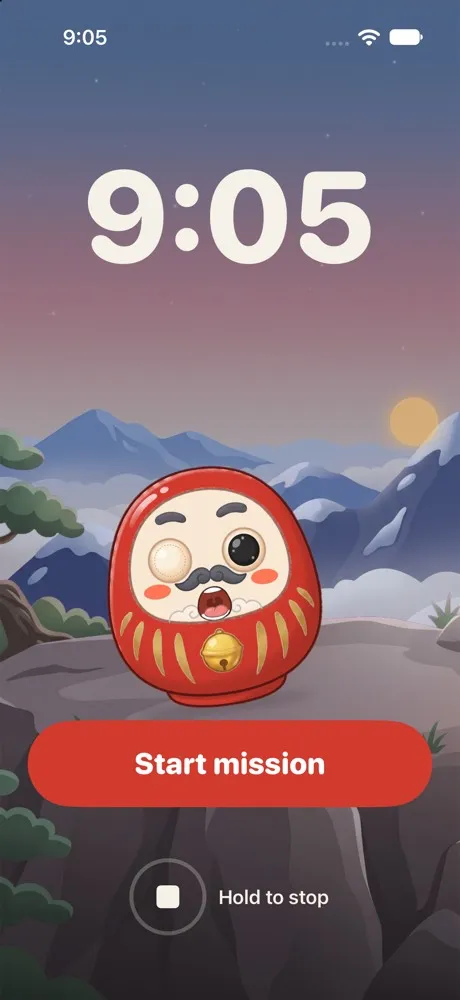
  1. Ringing screen: 9:05 in large type, Daruma shouting on a mountain ledge at sunrise, a red Start mission button and Hold to stop.

    1 Daruma rings

    Built on Apple's own alarm system, so it rings through Silent mode and Focus.

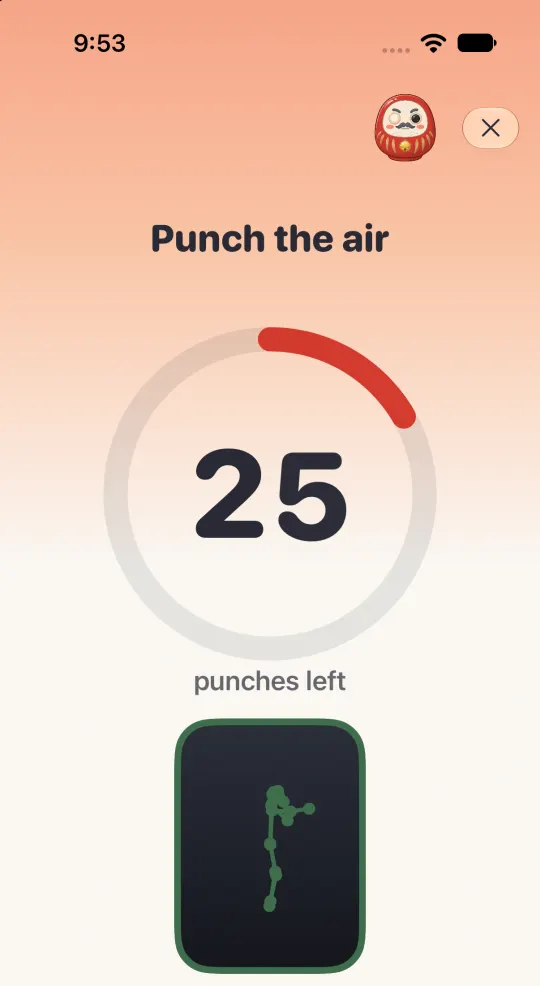
  2. Shadow boxing mission: Punch the air, 25 punches left, with the camera view below.

    2 You do the mission

    The alarm keeps ringing at full volume until the last task is done. Stop it from the Lock Screen and it rings again.

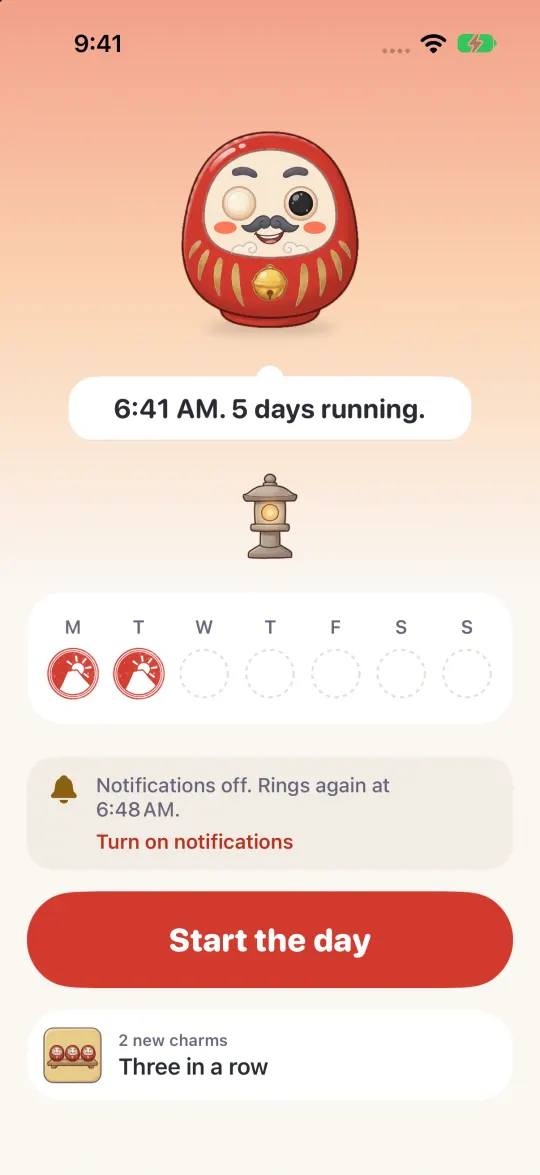
  3. Success screen: Daruma with one eye painted, 6:41 AM, 5 days running, a week of red seals and a Start the day button.

    3 The morning counts

    A seal for today. Back under the covers? Daruma checks in 3 to 10 minutes later and rings again if you don't answer.

The new one

Box your way awake. Or dance.

Stand the phone on a chair about two metres (six feet) away. Daruma watches through the front camera and counts every punch, or keeps time while you dance.

  • Out of bed, or it doesn't count. Daruma needs to see you standing, head to feet. Punching from under the duvet gets you nothing.
  • Counted on your iPhone. The picture is read on the phone and never uploaded.
  • A way out. Camera can't see you? Walk 30 steps instead.
Shadow boxing: Punch the air, 25 punches left.
Shadow boxing
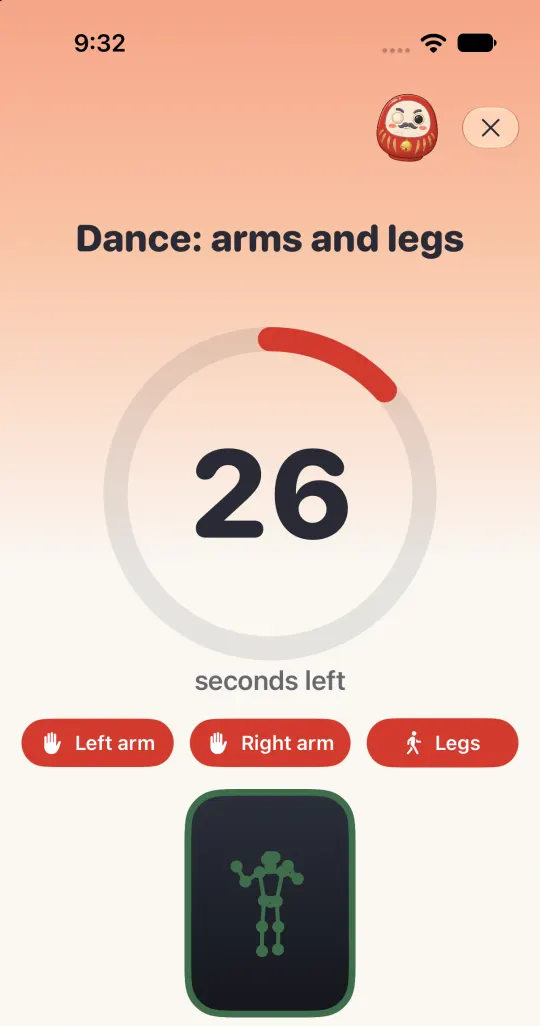
Dance it out: arms and legs, 26 seconds left, with Left arm, Right arm and Legs lit.
Dance it out

Missions

Brain or body. You pick.

A few of the ways Daruma gets you up. Mix them for the mornings you know will be hard.

  • Shadow boxing

    Punch the air in front of the camera. Every punch counted.

  • Math

    A few sums to switch your brain on.

  • Steps

    Walk a number of steps. Hard to do lying down.

  • And more

    The rest you'll meet on launch day.

Try one

6:45

Still ringing

7 × 8 = ?

Pick the right answer to stop it. (No sound here. The app is louder.)

The small things

Made for when you're half asleep.

It rings through Silent and Focus on Apple's own alarm system. The rest is built for the first, foggy minute of your day.

  • Wake-up check

    A few minutes after the mission Daruma asks "Still up?". Answer, or he rings again.

  • An honest emergency stop

    Hold for ten seconds to end it. That morning gets no seal, and nobody shames you.

  • No account, no peeking

    Nothing to sign up for in the app. The camera and microphone are read on your phone and nothing is uploaded.

Questions

Before you ask.

Is it free?

Free to download from the App Store.

Does it ring when my iPhone is on Silent?

Yes. Daruma Alarm uses Apple's alarm system (AlarmKit), so it rings through Silent mode and Focus like the Clock app does. There's a "Test my alarm" button to check your volume the night before.

Can't I just stop it from the Lock Screen?

You can press Stop, and it rings again until the mission is done. The bell keeps going while you do the mission. Blow listens through the microphone, so the bell pauses for it and comes back if you stop blowing.

Can I cheat?

You can try. For the camera missions Daruma has to see you standing, head to feet: punching or dancing from under the duvet counts nothing. Stop the alarm from the Lock Screen and it rings again until the mission is done.

What if I really can't do the mission?

Camera missions always offer a way out: walk 30 steps instead. Stuck on one? After 45 seconds you can do sums instead. In a real emergency, hold Stop for ten seconds; that morning just doesn't count.

Does the camera record me?

No video is uploaded. The camera missions read your pose on the iPhone, frame by frame, and no picture or video is sent anywhere.

When is it out, and on what?

December 2026, for iPhone with iOS 26 or later, in English first.

Be up on day one.

Daruma Alarm comes to iPhone in December. Look for it in the App Store, or write to us with anything you'd like to know.

Coming to the App Store in December

Free to download, for iPhone with iOS 26 or later.

Email us